﻿<!DOCTYPE html>
<head>
<link rel="icon" href="https://www.sealingad.com/statics/shisou/images/favicon.ico" type="image/x-icon"/>
<meta http-equiv="Content-Type" content="text/html; charset=utf-8" />
<title>印前检查清单:设计师如何准备你的印刷设计文件-北京西林品牌设计与包装设计</title>
<meta name="keywords" content="学习设计,设计基础,营销和广告,印刷设计,印刷设计文件,印前检查,设计修改,印前清单,印刷费用,字体间距" />
<meta name="description" content="让没有设计背景的人修改文件的危险在于，这可能会导致不必要的设计修改，从而破坏预期布局的整体效果。如果您想确保在桌面和打印店之间的翻译过程中不会丢失任何东西，对您的设计文件进行一步一步的印前检查可以节省您的时间和一系列令人头疼的问题。它也能为你省下一大笔钱！" />
<meta http-equiv="X-UA-Compatible" content="IE=edge">
<meta name="viewport" content="width=device-width,initial-scale=1,minimum-scale=1,maximum-scale=1,user-scalable=no">
<meta name="apple-mobile-web-app-capable" content="yes">
<meta name="apple-mobile-web-app-status-bar-style" content="black">
<meta name="format-detection" content="telephone=no">
<meta name="renderer" content="webkit">
<meta http-equiv="Cache-Control" content="no-siteapp"/>
<link rel="stylesheet" type="text/css" href="https://www.sealingad.com/statics/shisou/css/common.css">
<link rel="stylesheet" type="text/css" href="https://www.sealingad.com/statics/shisou/css/ny.css">
<link rel="canonical" href="https://www.sealingad.com/show-1519.html" />
<meta property="og:description" content="让没有设计背景的人修改文件的危险在于，这可能会导致不必要的设计修改，从而破坏预期布局的整体效果。如果您想确保在桌面和打印店之间的翻译过程中不会丢失任何东西，对您的设计文件进行一步一步的印前检查可以节省您的时间和一系列令人头疼的问题。它也能为你省下一大笔钱！" />
<meta property="og:site" content="https://www.sealingad.com/show-1519.html" />
<meta property="og:title" content="印前检查清单:设计师如何准备你的印刷设计文件" />
<script type="application/ld+json">
    {
        "@context": "https://ziyuan.baidu.com/contexts/cambrian.jsonld",
        "@id": "https://www.sealingad.com/show-1519.html",
        "appid": "1629849369625299",
        "title": "印前检查清单:设计师如何准备你的印刷设计文件",
        "images": [
		        "https://www.sealingad.com/uploadfile/ueditor/image/20230713/1689213317554670.png",
               "/content/dam/help/en/indesign/using/printers-marks-bleeds/jcr_content/main-pars/image_0/nm_05a.png.img.png",
               "https://helpx.adobe.com/content/dam/help/en/indesign/using/printers-marks-bleeds/jcr_content/main-pars/image_0/nm_05a.png.img.png",
               ], 
        "pubDate": "2023-07-13T09:42:45" 
    }
</script>
</head>
<body>
<div class="head wrap clearfix">
	<a href="/" class="logo"><img src="https://www.sealingad.com/statics/shisou/images/logo.png" alt="西林包装设计公司" /></a>
    <div class="tel"><img src="https://www.sealingad.com/statics/shisou/images/tel.png" alt="包装设计联系电话" /></div>
    <ul class="pcNav">
    	<li ><a href="/">首页</a></li>
                <li class=""><a href="/about.html">关于西林</a>
                </li>
                <li class=""><a href="/news.html">西林动态</a>
                </li>
                <li class=" cur"><a href="/industry.html">行业动态</a>
                </li>
                <li class=""><a href="/case.html">设计案例</a>
           
        	<div class="son">
                         <a href="/wenhuagongyefangchan.html">文化</a>
                         <a href="/canyinshipinkuaixiao.html">食品</a>
                         <a href="/pinpaiquanan.html">油品</a>
                         <a href="/yinpin.html">饮品</a>
                         <a href="/chaye.html">茶叶</a>
                         <a href="/naifen.html">奶粉</a>
                         <a href="/baojian.html">保健</a>
                         <a href="/meirongrihuayiliao.html">医药</a>
                         <a href="/haixian.html">海鲜</a>
                         <a href="/qita.html">品牌&其他</a>
              
            </div>
                    </li>
                <li class=""><a href="/job.html">加入西林</a>
                </li>
                <li class=""><a href="/contact.html">联系西林</a>
                </li>
         
    </ul>
    <ul class="menu_click">
      <li class="li_1"></li>
      <li class="li_2"></li>
      <li class="li_3"></li>
    </ul>
</div>
<ul class="nav">
    <li><a href="/">首页</a></li>
            <li class=""><a href="/about.html">关于西林<i></i></a>
                </li>
                <li class=""><a href="/news.html">西林动态<i></i></a>
                </li>
                <li class=" cur"><a href="/industry.html">行业动态<i></i></a>
                </li>
                <li class=""><a href=" javascript:; ">设计案例<i></i></a>
           
        	<div class="nav2">
                         <a href="/wenhuagongyefangchan.html">文化</a>
                         <a href="/canyinshipinkuaixiao.html">食品</a>
                         <a href="/pinpaiquanan.html">油品</a>
                         <a href="/yinpin.html">饮品</a>
                         <a href="/chaye.html">茶叶</a>
                         <a href="/naifen.html">奶粉</a>
                         <a href="/baojian.html">保健</a>
                         <a href="/meirongrihuayiliao.html">医药</a>
                         <a href="/haixian.html">海鲜</a>
                         <a href="/qita.html">品牌&其他</a>
              
            </div>
                    </li>
                <li class=""><a href="/job.html">加入西林<i></i></a>
                </li>
                <li class=""><a href="/contact.html">联系西林<i></i></a>
                </li>
         

</ul><div class="contactBanner clearfix"><img src="https://www.sealingad.com/statics/shisou/images/newsBanner.png" alt="产品包装设计" /></div>
<div class="prod">
    <div class="prod_cont">
        <h1>印前检查清单:设计师如何准备你的印刷设计文件</h1>
        <div class="pag"><em><strong>时间：</strong>2023-07-13 09:42</em><!-- <em><strong>来源：</strong><a href="http://www.sealingad.com/" target="_blank" style="padding: 0;background: #fff;margin: 0;color:#000;">西林设计</a></em> --></div>
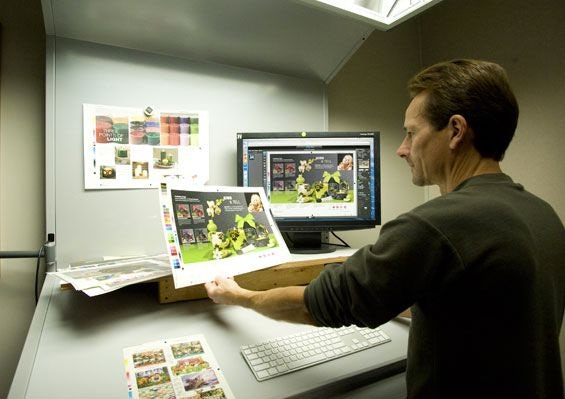
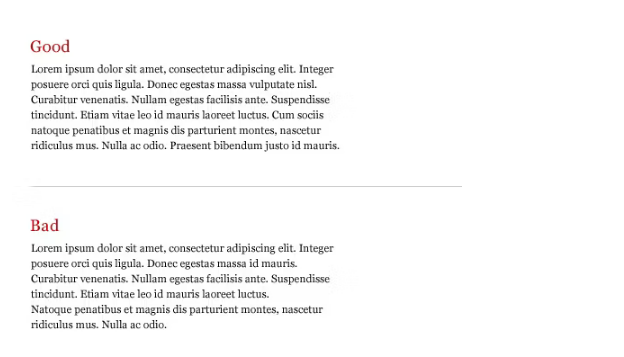
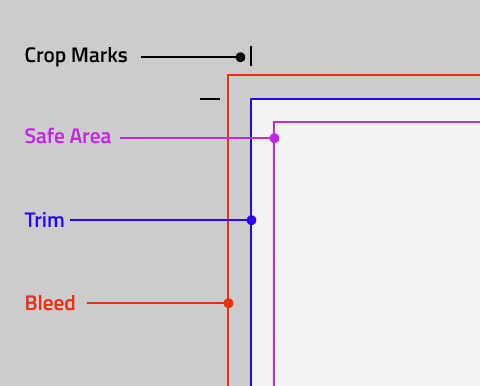
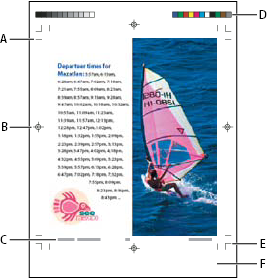
        <p>设计完美的宣传册、海报或名片的最佳方式是设计师和他们的客户一起工作。双方都应该参与到项目的每一步，从创意产生到印刷。不幸的是，他们中的一方或双方常常认为印前和印刷应该由印刷厂或印刷店的技术人员专门处理。</p><p><trans oldtip="This is a mistake!" newtip="这是一个错误！">这是一个错误！</trans></p><p><trans oldtip="The danger of having someone without a design background make modifications to your file is that it can result in unwanted design modifications that undermine the overall effect of the intended layout. If you want to ensure nothing gets lost in translation between your desktop and the print shop, conducting your own step-by-step prepress examination of your design files can save you time and a batch of headaches. It can also save you a ton of money!" newtip="让没有设计背景的人修改文件的危险在于，这可能会导致不必要的设计修改，从而破坏预期布局的整体效果。如果您想确保在桌面和打印店之间的翻译过程中不会丢失任何东西，对您的设计文件进行一步一步的印前检查可以节省您的时间和一系列令人头疼的问题。它也能为你省下一大笔钱！">让没有设计背景的人修改文件的危险在于，这可能会导致不必要的设计修改，从而破坏预期布局的整体效果。如果您想确保在桌面和打印店之间的翻译过程中不会丢失任何东西，对您的设计文件进行一步一步的印前检查可以节省您的时间和一系列令人头疼的问题。它也能为你省下一大笔钱！</trans></p><p style="text-align: center;"><img src="https://99designs-blog.imgix.net/blog/wp-content/uploads/2016/05/prepress.jpg?auto=format&q=60&fit=max&w=930" alt="prepress"/></p><p><br/></p><p>您的分步印前清单:</p><ol style="box-sizing: border-box; padding-left: 1em; margin-right: 160px; margin-bottom: 1.6rem; margin-left: 160px; color: rgb(49, 48, 48); font-family: Graphik, sans-serif; font-size: 19px; white-space: normal;" class=" list-paddingleft-2"><li><p><trans oldtip="Proofread everything" newtip="校对一切">校对一切</trans></p></li><li><p><trans oldtip="Check font spacing" newtip="检查字体间距">检查字体间距</trans></p></li><li><p><trans oldtip="Confirm image size and resolution" newtip="确认图像尺寸和分辨率">确认图像尺寸和分辨率</trans></p></li><li><p><trans oldtip="Ensure color accuracy " newtip="确保颜色准确性">确保颜色准确性</trans></p></li><li><p><trans oldtip="Calibrate your screens" newtip="校准您的屏幕">校准您的屏幕</trans></p></li><li><p><trans oldtip="Define bleed and crop marks" newtip="定义出血和裁剪标记">定义出血和裁剪标记</trans></p></li><li><p><trans oldtip="Take care of imposition" newtip="注意拼版">注意拼版</trans></p></li><li><p><trans oldtip="Create a high-resolution PDF" newtip="创建高分辨率PDF">创建高分辨率PDF</trans></p></li><li><p><trans oldtip="Select the perfect paper" newtip="选择完美的纸张">选择完美的纸张</trans></p></li></ol><p><trans oldtip=", 25-75% of a design project’s budget should be set aside for printing costs. If you don’t catch a mistake in prepress, it will be much more costly to fix down the line." newtip="，一个设计项目预算的25-75%应该预留给印刷费用。如果在印前没有发现错误，那么修复生产线的成本会高得多。">一个设计项目预算的25-75%应该预留给印刷费用。如果在印前没有发现错误，那么修复生产线的成本会高得多。</trans></p><p><trans oldtip="Preparing graphic design files for printing can be quick and easy once you know what elements to look for. To give you the upper hand when it comes time to print, we’ve put together a prepress checklist that covers everything you need to look for when finalizing your proof. It incorporates everything from simple editing to advanced technical procedures. And of course, both designer and client should be involved. Here’s our prepress checklist to help get you started:" newtip="一旦您知道要寻找哪些元素，准备印刷的图形设计文件就会变得快速而简单。为了让您在印刷时占据上风，我们整理了一份印前检查清单，涵盖了您在完成校样时需要查找的所有内容。它包含了从简单编辑到高级技术程序的所有内容。当然，设计师和客户都应该参与进来。以下是我们的印前清单，可以帮助您开始:">一旦您知道要寻找哪些元素，准备印刷的图形设计文件就会变得快速而简单。为了让您在印刷时占据上风，我们整理了一份印前检查清单，涵盖了您在完成校样时需要查找的所有内容。它包含了从简单编辑到高级技术程序的所有内容。当然，设计师和客户都应该参与进来。以下是我们的印前清单，可以帮助您开始:</trans></p><h2>1.&nbsp;<trans oldtip="Proofreed" newtip="证明自由">证明自由</trans><trans oldtip=" Proofread everything" newtip="校对一切">校对一切</trans><br style="box-sizing: border-box;"/>—</h2><p><trans oldtip="Small oversights, such as typos and grammatical errors, can be the difference between closing a sale and a customer choosing the competition. A " newtip="小疏忽，如打字错误和语法错误，可能是完成销售和客户选择竞争的区别。A">小疏忽，如打字错误和语法错误，可能是完成销售和客户选择竞争的区别。A</trans><trans oldtip="poll from Standing Dog Interactive" newtip="来自站立狗互动的投票">来自站立狗互动的投票</trans><trans oldtip=" found that only 3 percent of people didn’t mind errors, whereas most consider typos and grammar mistakes a deciding factor in whether to continue reading… or not." newtip="我发现只有3%的人不介意错误，然而大多数人认为错别字和语法错误是决定是否继续阅读的一个因素。">我发现只有3%的人不介意错误，然而大多数人认为错别字和语法错误是决定是否继续阅读的一个因素。</trans></p><p><trans oldtip="“Negative web user experiences hurt sales,” they write, “and the findings in this sampling indicate that typos and grammatical errors will likely cause a major segment of a company’s potential customers to have a negative experience on its website.”" newtip="“负面的网络用户体验会损害销售，”他们写道，“这次抽样调查的结果表明，打字错误和语法错误可能会导致一家公司的大部分潜在客户对其网站产生负面体验。”">“负面的网络用户体验会损害销售，”他们写道，“这次抽样调查的结果表明，打字错误和语法错误可能会导致一家公司的大部分潜在客户对其网站产生负面体验。”</trans></p><p><trans oldtip="Catching errors is even more important when you’re printing. Once your design is in the hands of your consumers, there’s no way to update it in real time." newtip="打印时，捕捉错误更为重要。一旦你的设计到了消费者手中，就没有办法实时更新了。">打印时，捕捉错误更为重要。一旦你的设计到了消费者手中，就没有办法实时更新了。</trans></p><p><trans oldtip="There are two types of proofreading you’ll need to address before you send your file to press. " newtip="在将文件发送给出版社之前，您需要进行两种类型的校对。">在将文件发送给出版社之前，您需要进行两种类型的校对。</trans>语言校对<trans oldtip=" covers what most people associate with editing: checking for grammar mistakes, typos, spelling and the overall flow of the language used in the ad." newtip="涵盖了大多数人与编辑相关的内容:检查语法错误、打字错误、拼写和广告中使用的语言的整体流程。">涵盖了大多数人与编辑相关的内容:检查语法错误、打字错误、拼写和广告中使用的语言的整体流程。</trans></p><p>印前校对(或图形校对)<trans oldtip=" touches on the visual appeal of the text from a graphic standpoint. Look for splitting words at the end of line breaks, the length of lines themselves and even text spacing. The biggest thing to be aware of is maintaining consistent line lengths when breaking sentences. Longer or shorter lines stand out and can really throw off the general uniformity in a block of text if not spaced properly." newtip="从图形的角度触及文本的视觉吸引力。在换行符的末尾寻找分裂的单词，行本身的长度，甚至文本间距。最需要注意的是在断句时保持一致的行长度。如果没有适当的间距，更长或更短的行会很突出，会破坏文本块的整体一致性。">从图形的角度触及文本的视觉吸引力。在换行符的末尾寻找分裂的单词，行本身的长度，甚至文本间距。最需要注意的是在断句时保持一致的行长度。如果没有适当的间距，更长或更短的行会很突出，会破坏文本块的整体一致性。</trans></p><p style="text-align: center;"><img src="https://www.sealingad.com/uploadfile/ueditor/image/20230713/1689213317554670.png" title="1689213317554670.png" alt="image.png"/></p><p><br/></p><h2><trans oldtip="2. Check font spacing" newtip="2.检查字体间距">2.检查字体间距</trans><br style="box-sizing: border-box;"/>—</h2><p><figure><img decoding="async" loading="lazy" src="https://99designs-blog.imgix.net/blog/wp-content/uploads/2014/01/TrackLead1st-copy.png?auto=format&q=60&fit=max&w=930" alt="TrackLead1st-copy" style="box-sizing: border-box; vertical-align: middle; border: 0px; max-width: 100%; height: auto; display: block; margin: 0px auto;"/></figure></p><p><trans oldtip="Once you’ve finished proofreading, it’s time to set the text spacing. Most fonts and design programs come out-of-the-box with some degree of optimization, but not adjusting your fonts using your own visual judgment will often leave them looking a little off." newtip="完成校对后，就该设置文本间距了。大多数字体和设计程序都进行了某种程度的优化，但是不使用自己的视觉判断来调整字体往往会让它们看起来有点差。">完成校对后，就该设置文本间距了。大多数字体和设计程序都进行了某种程度的优化，但是不使用自己的视觉判断来调整字体往往会让它们看起来有点差。</trans></p><p><trans oldtip="Classic typography procedures like adjusting the " newtip="经典的排版程序，如调整">经典的排版程序，如调整</trans><trans oldtip="leading" newtip="主要的">主要的</trans>,&nbsp;<trans oldtip="tracking" newtip="跟踪">跟踪</trans><trans oldtip=" and " newtip="和">和</trans><trans oldtip="kerning" newtip="字距调整">字距调整</trans><trans oldtip=" of your text is central to creating the the unique look you want to make your design stand out. Think of your entire image as a composition: each punctuation mark, letter, block of negative space and paragraph must work cohesively with the others to create a seamless experience for the viewer of your design." newtip="文字的中心是创造独特的外观，让你的设计脱颖而出。把你的整个图像想象成一幅作品:每一个标点符号、字母、空格和段落都必须与其他部分紧密结合，为你的设计的浏览者创造一个无缝的体验。">文字的中心是创造独特的外观，让你的设计脱颖而出。把你的整个图像想象成一幅作品:每一个标点符号、字母、空格和段落都必须与其他部分紧密结合，为你的设计的浏览者创造一个无缝的体验。</trans><br style="box-sizing: border-box;"/><a style="box-sizing: border-box; background-image: initial; background-position: 0px 0px; background-size: initial; background-repeat: initial; background-attachment: initial; background-origin: initial; background-clip: initial; line-height: inherit; transition: border-color 0.15s ease-out 0s; border-bottom: 2px solid rgba(49, 48, 48, 0.2);" name="3"></a></p><h2><trans oldtip="3. Confirm image size and resolution" newtip="3.确认图像尺寸和分辨率">3.确认图像尺寸和分辨率</trans><br style="box-sizing: border-box;"/>—</h2><p><trans oldtip="Double check the resolution of your imagery before printing. This means not only noting the resolution of photos in your design, but also the resolution you save your whole final draft at." newtip="打印前仔细检查图像的分辨率。这意味着不仅要注意设计中照片的分辨率，还要注意保存整个最终草稿的分辨率。">打印前仔细检查图像的分辨率。这意味着不仅要注意设计中照片的分辨率，还要注意保存整个最终草稿的分辨率。</trans></p><p><trans oldtip="Print items should be saved at " newtip="打印项目应保存在">打印项目应保存在</trans>300 DPI或更高<trans oldtip=", but as Sara Duane-Gladden at " newtip="，但莎拉·杜安，高兴地">，但莎拉·杜安，高兴地</trans><trans oldtip="SpeckyBoy" newtip="斑点男孩">斑点男孩</trans><trans oldtip=" writes “a good rule of thumb is to always save your design files at the highest resolution possible. Though you can scale an image down if you must, it is impossible to add pixels after the fact.”" newtip="写道“一个好的经验法则是总是以尽可能高的分辨率保存你的设计文件。尽管如果有必要，你可以缩小图像，但事后添加像素是不可能的。”">写道“一个好的经验法则是总是以尽可能高的分辨率保存你的设计文件。尽管如果有必要，你可以缩小图像，但事后添加像素是不可能的。”</trans></p><p><trans oldtip="In general, it’s best to never enlarge photos more than 20 percent of their original size. Resizing images in your document changes the output resolution of your image in the document as well. This is especially true for large-sized flyers and brochures, and advertorials with photo-quality images. If you are printing on canvas however, 100 DPI can suffice up to a certain size." newtip="一般来说，最好不要将照片放大超过原始尺寸的20%。调整文档中图像的大小也会改变文档中图像的输出分辨率。对于大尺寸的传单和小册子以及带有照片质量图像的广告来说尤其如此。但是，如果在画布上打印，100 DPI就足够了。">一般来说，最好不要将照片放大超过原始尺寸的20%。调整文档中图像的大小也会改变文档中图像的输出分辨率。对于大尺寸的传单和小册子以及带有照片质量图像的广告来说尤其如此。但是，如果在画布上打印，100 DPI就足够了。</trans></p><p style="text-align: center;"><img src="https://99designs-blog.imgix.net/blog/wp-content/uploads/2016/05/72-dpi-vs-300-dpi.jpg?auto=format&q=60&fit=max&w=930" alt="72-dpi-vs-300-dpi"/></p><p><br/></p><h2><trans oldtip="4. Ensure color accuracy (CMYK vs RGB)" newtip="4.确保颜色准确性(CMYK与RGB)">4.确保颜色准确性(CMYK与RGB)</trans><br style="box-sizing: border-box;"/>—</h2><p><figure style="text-align: center;"><img decoding="async" loading="lazy" src="https://99designs-blog.imgix.net/blog/wp-content/uploads/2016/05/rgb-cmyk.png?auto=format&q=60&fit=max&w=930" alt="rgb-cmyk" style="box-sizing: border-box; vertical-align: middle; border: 0px; max-width: 100%; height: auto;"/></figure></p><p><trans oldtip="When it comes to printing your design files, what you see on screen is oftentimes not what you get from the printer. One way to ensure that what you see on your screen will match what comes out of the printer is to check the existing color mode of your design." newtip="当打印设计文件时，你在屏幕上看到的往往不是你从打印机上得到的。确保您在屏幕上看到的内容与打印机输出的内容相符的一种方法是检查设计的现有颜色模式。">当打印设计文件时，你在屏幕上看到的往往不是你从打印机上得到的。确保您在屏幕上看到的内容与打印机输出的内容相符的一种方法是检查设计的现有颜色模式。</trans></p><p><trans oldtip="Computer screens and digital cameras view color and light in different spectrums than printers do, and failing to sync the two will reflect horribly in your print. Electronics that produce visual light or interpret it via a sensor use the RGB spectrum to make colors, because mixing light in these colors is easy and smooth." newtip="电脑屏幕和数码相机看到的颜色和光线的光谱与打印机不同，如果两者不同步，打印出来的照片会很糟糕。产生可见光或通过传感器解释可见光的电子设备使用RGB光谱来产生颜色，因为混合这些颜色的光容易且平滑。">电脑屏幕和数码相机看到的颜色和光线的光谱与打印机不同，如果两者不同步，打印出来的照片会很糟糕。产生可见光或通过传感器解释可见光的电子设备使用RGB光谱来产生颜色，因为混合这些颜色的光容易且平滑。</trans></p><p><trans oldtip="Most (if not all) design software programs use the RGB color mode by default. Printers, however, use the CMYK process to overlay different intensities of each tone and create the full range of colors. This additive process—as opposed to the subtractive RGB system—involves adding color to create deeper colors on the way to black, not adding light to move away from black." newtip="大多数(如果不是全部)设计软件程序默认使用RGB颜色模式。然而，打印机使用CMYK处理来叠加每个色调的不同强度，并创建全范围的颜色。与减色法RGB系统相反，这种加色过程涉及添加颜色以创建更深的黑色，而不是添加光线以远离黑色。">大多数(如果不是全部)设计软件程序默认使用RGB颜色模式。然而，打印机使用CMYK处理来叠加每个色调的不同强度，并创建全范围的颜色。与减色法RGB系统相反，这种加色过程涉及添加颜色以创建更深的黑色，而不是添加光线以远离黑色。</trans></p><p><trans oldtip="If you want to learn more about the difference between the two, " newtip="如果你想进一步了解两者的区别，">如果你想进一步了解两者的区别，</trans><trans oldtip="check out this blog post" newtip="看看这篇博文">看看这篇博文</trans><trans oldtip=" or watch the video below. But the basic takeaway: if your computer and printer aren’t speaking the same color language, your results aren’t going to come out right. So set your program to CMYK." newtip="或者看下面的视频。但是基本要点是:如果你的电脑和打印机不使用相同的颜色语言，你的结果就不会正确。所以把你的程序设置成CMYK。">或者看下面的视频。但是基本要点是:如果你的电脑和打印机不使用相同的颜色语言，你的结果就不会正确。所以把你的程序设置成CMYK。</trans></p><h2><trans oldtip="5. Calibrate your screens" newtip="5.校准您的屏幕">5.校准您的屏幕</trans><br style="box-sizing: border-box;"/>—</h2><p><trans oldtip="Another way to ensure color accuracy is to calibrate your screen before you print. When you are printing mock-up drafts, the true tone of your colors can easily be thrown off by a screen that is inaccurate." newtip="另一种确保颜色准确性的方法是在打印前校准屏幕。当您打印模型草稿时，不准确的屏幕很容易影响颜色的真实色调。">另一种确保颜色准确性的方法是在打印前校准屏幕。当您打印模型草稿时，不准确的屏幕很容易影响颜色的真实色调。</trans></p><p><trans oldtip="Graphic designers and photographers have a range of tools to check the color accuracy of their images before sending a design off to the press, and making sure your imagery is correct before you send your specs to the press can quickly save you a whole lot of money in misprints." newtip="平面设计师和摄影师有一系列工具可以在将设计发送给媒体之前检查图像的颜色准确性，在将规格发送给媒体之前确保图像是正确的，可以迅速为您节省大量印刷错误的费用。">平面设计师和摄影师有一系列工具可以在将设计发送给媒体之前检查图像的颜色准确性，在将规格发送给媒体之前确保图像是正确的，可以迅速为您节省大量印刷错误的费用。</trans></p><p><figure data-id="115252" id="mediaattachment_115252"><img decoding="async" loading="lazy" class="wp-image-115252 size-full" src="https://99designs-blog.imgix.net/blog/wp-content/uploads/2016/05/calibration.jpg?auto=format&q=60&fit=max&w=930" alt="differen monitor calibrations" width="710" height="249" style="box-sizing: border-box; height: auto; max-width: 100%; vertical-align: middle; border: 0px; display: block; margin: 0px auto;"/></figure></p><p><trans oldtip="It’s important to realize that customers and designers may have their monitors calibrated differently, which could lead to issues in communication. It’s often helpful to view a design on several different devices to see if that’s a potential issue. Or, even better, to print the design off! While the colors won’t perfectly match those that you’ll get from a professional printer, this small step can help you notice small differences you’re not seeing on your monitor." newtip="重要的是要认识到，客户和设计师可能会对他们的显示器进行不同的校准，这可能会导致沟通问题。在几个不同的设备上查看一个设计通常有助于了解这是否是一个潜在的问题。或者，更好的是，把设计打印出来！虽然颜色不会与专业打印机打印出的颜色完美匹配，但这一小步可以帮助您注意到显示器上看不到的细微差异。">重要的是要认识到，客户和设计师可能会对他们的显示器进行不同的校准，这可能会导致沟通问题。在几个不同的设备上查看一个设计通常有助于了解这是否是一个潜在的问题。或者，更好的是，把设计打印出来！虽然颜色不会与专业打印机打印出的颜色完美匹配，但这一小步可以帮助您注意到显示器上看不到的细微差异。</trans><br style="box-sizing: border-box;"/><br/></p><h2><trans oldtip="6. Define bleed and crop marks" newtip="6.定义出血和裁剪标记">6.定义出血和裁剪标记</trans><br style="box-sizing: border-box;"/>—</h2><p><figure data-id="115257" id="mediaattachment_115257"><img decoding="async" loading="lazy" class="wp-image-115257 size-full" src="https://99designs-blog.imgix.net/blog/wp-content/uploads/2016/05/bleed-trim.png?auto=format&q=60&fit=max&w=930" alt="bleed-trim" width="480" height="386" style="box-sizing: border-box; height: auto; max-width: 100%; vertical-align: middle; border: 0px;"/><figcaption style="text-align: center;"><br/></figcaption></figure></p><p><trans oldtip="Taking your design from the digital realm to the physical involves making sure your file’s " newtip="将您的设计从数字领域带到物理领域需要确保您的文件">将您的设计从数字领域带到物理领域需要确保您的文件</trans><trans oldtip="bleed, crop and cuts" newtip="出血、裁剪和切割">出血、裁剪和切割</trans><trans oldtip=" are lined up properly. These marks indicate the edges of your design and where cuts should be made once things are printed. These will give your design that professional, designed-all-the-way-to-the-edge-of-the-page feel." newtip="排列整齐。这些标记表示设计的边缘，以及打印后应该在哪里进行切割。这些会给你的设计带来专业的、设计新颖的感觉。">排列整齐。这些标记表示设计的边缘，以及打印后应该在哪里进行切割。这些会给你的设计带来专业的、设计新颖的感觉。</trans></p><p>作物标记<trans oldtip=" indicate where your design will be cut, and the " newtip="指示您的设计将被剪切的位置，以及">指示您的设计将被剪切的位置，以及</trans>流血<trans oldtip=" is where parts of text or objects extend past the page boundary to compensate for trimming. The " newtip="是部分文本或对象超出页面边界以补偿裁切的地方。这">是部分文本或对象超出页面边界以补偿裁切的地方。这</trans>鼻涕虫<trans oldtip=" is an area that is well outside the bleed that features printer instructions, additional info on the print, and other need-to-know stuff about the job. Ignoring the bleed will run you the risk of having a white border along one side, where the physical paper extended beyond your digital design. Not pretty." newtip="是出血区域之外的一个区域，包含打印机说明、打印的附加信息以及其他与工作相关的重要信息。忽略出血会让你有一面出现白边的风险，因为实体纸张超出了你的数字设计。不漂亮。">是出血区域之外的一个区域，包含打印机说明、打印的附加信息以及其他与工作相关的重要信息。忽略出血会让你有一面出现白边的风险，因为实体纸张超出了你的数字设计。不漂亮。</trans></p><p><trans oldtip="If your text or images buttress the crop edge or a fold, it’s also immensely important that you consider the cutting tolerance of your chosen paper. Subtle differences in your layout can make a big difference when it comes to symmetry once your flyer is cut or bound." newtip="如果您的文本或图像支撑着裁剪边缘或折痕，那么考虑所选纸张的裁剪公差也是非常重要的。当你的传单被裁剪或装订后，布局上的细微差别会对对称性产生很大的影响。">如果您的文本或图像支撑着裁剪边缘或折痕，那么考虑所选纸张的裁剪公差也是非常重要的。当你的传单被裁剪或装订后，布局上的细微差别会对对称性产生很大的影响。</trans></p><p><trans oldtip="For more info on lining up and signaling your crop, bleed, slug and more, check out this " newtip="更多关于排队和发信号给你的作物，出血，鼻涕虫和更多的信息，看看这个">更多关于排队和发信号给你的作物，出血，详细看这：</trans></p><h2 id="specify_printer_s_marks"><trans oldtip="Specify printer’s marks" newtip="指定打印机的标记">指定打印机的标记</trans></h2><p><trans oldtip="When you prepare a document for printing, a number of marks are needed to help the printer determine where to trim the paper, align separation films when producing proofs, measure film for correct calibration and dot density, and so on. Selecting any page-mark option expands the page boundaries to accommodate printer’s marks, " newtip="准备打印文档时，需要许多标记来帮助打印机确定纸张的裁切位置，在制作校样时对齐分色胶片，测量胶片的校准和网点密度是否正确，等等。选择任何页面标记选项都会扩展页面边界以容纳打印机标记，">准备打印文档时，需要许多标记来帮助打印机确定纸张的裁切位置，在制作校样时对齐分色胶片，测量胶片的校准和网点密度是否正确，等等。选择任何页面标记选项都会扩展页面边界以容纳打印机标记，</trans>流血<trans oldtip=" (the parts of text or objects that extend past the page boundary to account for slight inaccuracy when trimming), or " newtip="(超出页面边界的文本或对象部分，以弥补裁切时的微小误差)，或">(超出页面边界的文本或对象部分，以弥补裁切时的微小误差)，或</trans>废料区<trans oldtip="(an area outside the page and bleed that contains printer instructions or job sign-off information)." newtip="(页面和出血之外的区域，包含打印机说明或作业签署信息)。">(页面和出血之外的区域，包含打印机说明或作业签署信息)。</trans></p><p><trans oldtip="If you are setting crop marks and want the artwork to contain a bleed or slug area, make sure that you extend the artwork past the crop marks to accommodate the bleed or slug. Also make sure that your media size is large enough to contain the page and any printer’s marks, bleeds, or the slug area. If a document doesn’t fit the media, you can control where items are clipped by using the Page Position option in the Setup area of the Print dialog box." newtip="如果要设置裁剪标记，并希望图稿包含出血或辅助信息区域，请确保将图稿延伸到裁剪标记之外，以容纳出血或辅助信息。还要确保您的介质大小足够大，能够容纳页面和任何打印机标记、出血或辅助信息区。如果文档不适合介质，您可以使用“打印”对话框的“设置”区域中的“页面位置”选项来控制剪切项目的位置。">如果要设置裁剪标记，并希望图稿包含出血或辅助信息区域，请确保将图稿延伸到裁剪标记之外，以容纳出血或辅助信息。还要确保您的介质大小足够大，能够容纳页面和任何打印机标记、出血或辅助信息区。如果文档不适合介质，您可以使用“打印”对话框的“设置”区域中的“页面位置”选项来控制剪切项目的位置。</trans></p><p><trans oldtip="If you select the Crop Marks option, fold marks are printed as solid lines when spreads are printed." newtip="如果选择“裁剪标记”选项，打印跨页时，折叠标记将打印为实线。">如果选择“裁剪标记”选项，打印跨页时，折叠标记将打印为实线。</trans></p><p></p><p><figure><p style="text-align: center;"><img id="root_content_flex_items_position_position-par_image_0" data-src="/content/dam/help/en/indesign/using/printers-marks-bleeds/jcr_content/main-pars/image_0/nm_05a.png.img.png" src="https://helpx.adobe.com/content/dam/help/en/indesign/using/printers-marks-bleeds/jcr_content/main-pars/image_0/nm_05a.png.img.png" title="Printer’s marks" class=" dexter-LazyImage " style="border: 0px; box-sizing: border-box; vertical-align: top; max-width: 100%;"/></p><figcaption><trans oldtip="Printer’s marks" newtip="印刷商标">印刷商标</trans></figcaption></figure></p><p></p><p>A.<trans oldtip=" Crop marks " newtip="作物标记">作物标记</trans>B.<trans oldtip=" Registration mark " newtip="牌照">牌照</trans>C.<trans oldtip=" Page information " newtip="页面信息">页面信息</trans>D.<trans oldtip=" Color bars " newtip="颜色条">颜色条</trans>E.<trans oldtip=" Bleed marks " newtip="出血标记">出血标记</trans>F.<trans oldtip=" Slug area " newtip="废料区">废料区</trans></p><ol class="steps list-paddingleft-2" style="border: 0px; box-sizing: border-box; padding-left: 20px; counter-reset: step-counter 0;"><li><p><trans oldtip=" Choose File &amp;gt; Print. " newtip="选择文件&amp;gt;打印。">选择文件&gt;打印。</trans></p></li><li><p><trans oldtip=" Click Marks and Bleed on the left side of the Print dialog box. " newtip="单击“打印”对话框左侧的“标记和出血”。">单击“打印”对话框左侧的“标记和出血”。</trans></p></li><li><p><trans oldtip=" Select either All Printer’s Marks or individual marks. " newtip="选择所有打印机标记或单个标记。">选择所有打印机标记或单个标记。</trans></p></li></ol><h2 id="print_the_bleed_or_slug_areas"><trans oldtip="Print the bleed or slug areas" newtip="打印出血或辅助信息区域">打印出血或辅助信息区域</trans></h2><p><trans oldtip="Specify the bleed and slug areas in the " newtip="在中指定出血和辅助信息区">在中指定出血和辅助信息区</trans>文档设置<trans oldtip=" dialog box. The bleed and slug areas are discarded when the document is trimmed to its final page size. Objects outside the bleed or slug area (whichever extends farthest) are not printed." newtip="对话框。当文档被裁切到其最终页面大小时，出血和辅助信息区将被丢弃。出血区域或辅助信息区域之外的对象(以延伸最远的为准)不会被打印。">对话框。当文档被裁切到其最终页面大小时，出血和辅助信息区将被丢弃。出血区域或辅助信息区域之外的对象(以延伸最远的为准)不会被打印。</trans></p><p><trans oldtip="When printing, you can override the default location for bleed marks in the Bleed And Slug area of the Marks And Bleed area." newtip="打印时，您可以在标记和出血区域的出血和辅助信息区中覆盖出血标记的默认位置。">打印时，您可以在标记和出血区域的出血和辅助信息区中覆盖出血标记的默认位置。</trans></p><p><trans oldtip="Files saved in PostScript file format allow capable post-processing programs to implement their own variable bleed. " newtip="以PostScript文件格式保存的文件允许有能力的后处理程序实现它们自己的可变出血。">以PostScript文件格式保存的文件允许有能力的后处理程序实现它们自己的可变出血。</trans></p><ol class="steps list-paddingleft-2" style="border: 0px; box-sizing: border-box; padding-left: 20px; counter-reset: step-counter 0;"><li><p><trans oldtip=" Choose File &amp;gt; Print. " newtip="选择文件&amp;gt;打印。">选择文件&gt;打印。</trans></p></li><li><p><trans oldtip=" Click Marks And Bleed on the left side of the Print dialog box. " newtip="单击“打印”对话框左侧的“标记和出血”。">单击“打印”对话框左侧的“标记和出血”。</trans></p></li><li><p><trans oldtip=" Select either All Printer’s Marks or individual marks. " newtip="选择所有打印机标记或单个标记。">选择所有打印机标记或单个标记。</trans></p></li><li><p><trans oldtip=" To override bleed settings in the " newtip="覆盖中的出血设置">覆盖中的出血设置</trans>文档设置<trans oldtip=" dialog box, uncheck Use Document Bleed Settings and enter values from 0 to 6 inches (or equivalents) for Top, Bottom, Left, and Right (for single-sided documents), or Top, Bottom, Inside, and Outside (for double‑sided documents with facing pages). To extend the offset evenly on all sides of the page, click the Make All Settings The Same icon " newtip="对话框中，取消选中“使用文档出血设置”,并为“上”、“下”、“左”、“右”(对于单面文档)或“上”、“下”、“内”、“外”(对于双面文档)输入0到6英寸(或等效值)。要在页面的所有边上均匀扩展偏移，请单击使所有设置相同图标">对话框中，取消选中“使用文档出血设置”,并为“上”、“下”、“左”、“右”(对于单面文档)或“上”、“下”、“内”、“外”(对于双面文档)输入0到6英寸(或等效值)。要在页面的所有边上均匀扩展偏移，请单击使所有设置相同图标</trans><img alt="" src="https://helpx.adobe.com/content/dam/help/icons/P_Link_Sm_N.png" style="border: 0px; box-sizing: border-box; width: auto; max-width: 100%; margin-right: 0px !important;"/>.</p></li><li><p><trans oldtip=" Click Include Slug Area to print objects using the slug area defined in the " newtip="单击“包括辅助信息区”以使用中定义的辅助信息区打印对象">单击“包括辅助信息区”以使用中定义的辅助信息区打印对象</trans>文档设置<trans oldtip=" dialog box. " newtip="对话框。">对话框。</trans></p></li></ol><p><trans oldtip="Note:" newtip="注意:">注意:</trans>&nbsp;</p><p><trans oldtip="You can preview the bleed and slug areas before printing by clicking the Bleed Preview Mode " newtip="通过单击出血预览模式，可以在打印前预览出血和辅助信息区">通过单击出血预览模式，可以在打印前预览出血和辅助信息区</trans><img alt="" src="https://helpx.adobe.com/content/dam/help/icons/BleedPreviewMode.png" style="border: 0px; box-sizing: border-box; width: auto; max-width: 100%; vertical-align: top;"/><trans oldtip=" or the Slug Preview Mode icon " newtip="或Slug预览模式图标">或Slug预览模式图标</trans><img alt="" src="https://helpx.adobe.com/content/dam/help/icons/SlugPreviewMode.png" style="border: 0px; box-sizing: border-box; width: auto; max-width: 100%; vertical-align: top;"/><trans oldtip=" at the bottom of the Toolbox. (These may be hidden by the Preview Mode icon " newtip="在工具箱的底部。(这些可能被预览模式图标隐藏">在工具箱的底部。(这些可能被预览模式图标隐藏</trans><img alt="" src="https://helpx.adobe.com/content/dam/help/icons/P_MenuScreenMode_Sm_N.png" style="border: 0px; box-sizing: border-box; width: auto; max-width: 100%; vertical-align: top;"/>.)</p><h2 id="marks_and_bleed_options"><trans oldtip="Marks and Bleed options" newtip="标记和出血选项">标记和出血选项</trans></h2><p><trans oldtip="The Marks And Bleed area includes the following options:" newtip="标记和出血区域包括以下选项:">标记和出血区域包括以下选项:</trans></p><p>所有印刷商的标记</p><p><trans oldtip="Selects all printer’s marks including crop marks, bleed marks, registration marks, color bars, and page information." newtip="选择所有打印机标记，包括裁剪标记、出血标记、套准标记、色带和页面信息。">选择所有打印机标记，包括裁剪标记、出血标记、套准标记、色带和页面信息。</trans></p><p>作物标记</p><p><trans oldtip="Adds fine (hairline) horizontal and vertical rules that define where the page should be trimmed. Crop marks can also help register (align) one color separation to another. By using together with bleed marks, you can select overlapped marks." newtip="添加精细(细线)水平和垂直嵌线，用于定义页面的修剪位置。裁剪标记也有助于将一种分色与另一种分色对齐。通过与出血标记一起使用，可以选择重叠的标记。">添加精细(细线)水平和垂直嵌线，用于定义页面的修剪位置。裁剪标记也有助于将一种分色与另一种分色对齐。通过与出血标记一起使用，可以选择重叠的标记。</trans></p><p>出血标记</p><p><trans oldtip="Adds fine (hairline) rules that define the amount of extra area to image outside the defined page size." newtip="添加精细(细线)规则，用于定义图像在定义的页面尺寸之外的额外区域量。">添加精细(细线)规则，用于定义图像在定义的页面尺寸之外的额外区域量。</trans></p><p>注册标记</p><p><trans oldtip="Adds small “targets” outside the page area for aligning the different separations in a color document." newtip="在页面区域外添加小“目标”，用于对齐彩色文档中的不同分色。">在页面区域外添加小“目标”，用于对齐彩色文档中的不同分色。</trans></p><p>颜色条</p><p><trans oldtip="Adds small squares of color representing the CMYK inks and tints of gray (in 10% increments). Your service provider uses these marks to adjust ink density on the printing press." newtip="添加代表CMYK油墨和灰色色调的小方块颜色(增量为10%)。您的服务提供商使用这些标记来调整印刷机上的油墨密度。">添加代表CMYK油墨和灰色色调的小方块颜色(增量为10%)。您的服务提供商使用这些标记来调整印刷机上的油墨密度。</trans></p><p>页面信息</p><p><trans oldtip="Prints the filename, page number, current date and time, and color separation name in 6-point Helvetica in the lower-left corner of each sheet of paper or film. The Page Information option requires 0.5 inches (13mm) along the horizontal edge." newtip="在每张纸或胶片的左下角以6磅Helvetica打印文件名、页码、当前日期和时间以及分色名称。页面信息选项要求水平边缘为0.5英寸(13毫米)。">在每张纸或胶片的左下角以6磅Helvetica打印文件名、页码、当前日期和时间以及分色名称。页面信息选项要求水平边缘为0.5英寸(13毫米)。</trans></p><p><trans oldtip="Please note that page information is printed in GothicBBB-Medium-83pv-RKSJ-H (Medium Gothic) font." newtip="请注意，页面信息以GothicBBB-Medium-83pv-RKSJ-H(中哥特)字体打印。">请注意，页面信息以GothicBBB-Medium-83pv-RKSJ-H(中哥特)字体打印。</trans></p><p>类型</p><p><trans oldtip="Lets you choose default printer’s marks or custom marks (for Japanese pages, for example). You can create custom printer’s marks or use custom marks created by another company." newtip="让您选择默认打印机标记或自定义标记(例如，对于日文页面)。您可以创建自定义打印机标记或使用其他公司创建的自定义标记。">让您选择默认打印机标记或自定义标记(例如，对于日文页面)。您可以创建自定义打印机标记或使用其他公司创建的自定义标记。</trans></p><p>重量</p><p><trans oldtip="Displays possible weights for crop and bleed mark lines." newtip="显示裁剪线和出血线的可能粗细。">显示裁剪线和出血线的可能粗细。</trans></p><p>抵消</p><p><trans oldtip="Specifies how far from the edge of the page (not the bleed) InDesign will draw printer’s marks. By default, InDesign draws printer’s marks 6 points from the edge of the page. To avoid drawing printer’s marks on a bleed, be sure to enter an Offset value greater than the Bleed value." newtip="指定InDesign将在距离页面边缘(不是出血)多远的地方绘制打印机标记。默认情况下，InDesign在距离页面边缘6磅处绘制打印机标记。为了避免在出血上绘制打印机标记，请确保输入大于出血值的偏移值。">指定InDesign将在距离页面边缘(不是出血)多远的地方绘制打印机标记。默认情况下，InDesign在距离页面边缘6磅处绘制打印机标记。为了避免在出血上绘制打印机标记，请确保输入大于出血值的偏移值。</trans></p><p><trans oldtip="Specifies how far from the edge of the page (not the bleed) InDesign will draw printer’s marks. By default, InDesign draws printer’s marks 6 points from the edge of the page. To avoid drawing printer’s marks on a bleed, be sure to enter an Offset value greater than the Bleed value." newtip="指定InDesign将在距离页面边缘(不是出血)多远的地方绘制打印机标记。默认情况下，InDesign在距离页面边缘6磅处绘制打印机标记。为了避免在出血上绘制打印机标记，请确保输入大于出血值的偏移值。"><br/></trans></p><p><trans oldtip="Specifies how far from the edge of the page (not the bleed) InDesign will draw printer’s marks. By default, InDesign draws printer’s marks 6 points from the edge of the page. To avoid drawing printer’s marks on a bleed, be sure to enter an Offset value greater than the Bleed value." newtip="指定InDesign将在距离页面边缘(不是出血)多远的地方绘制打印机标记。默认情况下，InDesign在距离页面边缘6磅处绘制打印机标记。为了避免在出血上绘制打印机标记，请确保输入大于出血值的偏移值。"><br/></trans></p><p><trans oldtip="Specifies how far from the edge of the page (not the bleed) InDesign will draw printer’s marks. By default, InDesign draws printer’s marks 6 points from the edge of the page. To avoid drawing printer’s marks on a bleed, be sure to enter an Offset value greater than the Bleed value." newtip="指定InDesign将在距离页面边缘(不是出血)多远的地方绘制打印机标记。默认情况下，InDesign在距离页面边缘6磅处绘制打印机标记。为了避免在出血上绘制打印机标记，请确保输入大于出血值的偏移值。"><br/></trans></p><p><trans oldtip="Specifies how far from the edge of the page (not the bleed) InDesign will draw printer’s marks. By default, InDesign draws printer’s marks 6 points from the edge of the page. To avoid drawing printer’s marks on a bleed, be sure to enter an Offset value greater than the Bleed value." newtip="指定InDesign将在距离页面边缘(不是出血)多远的地方绘制打印机标记。默认情况下，InDesign在距离页面边缘6磅处绘制打印机标记。为了避免在出血上绘制打印机标记，请确保输入大于出血值的偏移值。"></trans></p><h2><trans oldtip="7. Take care of imposition" newtip="7.注意拼版">7.注意拼版</trans><br style="box-sizing: border-box;"/>—</h2><p><trans oldtip="No, it’s not just that annoying dude at a party who keeps following you around and trying to inject himself into all of your conversations… In printing, imposition is the process of arranging all of the pages of your design onto the paper in order to print faster and reduce extra paper waste." newtip="不，不仅仅是那个讨厌的家伙在聚会上一直跟着你，并试图将自己融入到你的所有谈话中…在印刷中，拼版是将你设计的所有页面排列到纸上的过程，以便更快地印刷并减少额外的纸张浪费。">不，不仅仅是那个讨厌的家伙在聚会上一直跟着你，并试图将自己融入到你的所有谈话中…在印刷中，拼版是将你设计的所有页面排列到纸上的过程，以便更快地印刷并减少额外的纸张浪费。</trans></p><p><figure data-id="115262" id="mediaattachment_115262" style="text-align: center;"><img decoding="async" loading="lazy" class="wp-image-115262 size-full" src="https://99designs-blog.imgix.net/blog/wp-content/uploads/2016/05/imposition.png?auto=format&q=60&fit=max&w=930" alt="imposition" width="552" height="215" style="box-sizing: border-box; height: auto; max-width: 100%; vertical-align: middle; border: 0px;"/><figcaption><br/></figcaption></figure></p><p><trans oldtip="Taking bound materials to the press used to require a lot more organization. From lining up pages to ensuring they are evenly set back to back when printed, printing booklets and multi-page pamphlets was a task. Thanks to Adobe Publisher, and similar layout-oriented programs, setting up a multi-page design to be published in a brochure or booklet is much easier." newtip="把装订好的材料送到出版社过去需要更多的组织工作。从对齐页面到确保它们在打印时均匀地背靠背排列，打印小册子和多页小册子是一项任务。由于有了Adobe Publisher和类似的面向版式的程序，设置要在小册子或手册中发布的多页设计变得容易多了。">把装订好的材料送到出版社过去需要更多的组织工作。从对齐页面到确保它们在打印时均匀地背靠背排列，打印小册子和多页小册子是一项任务。由于有了Adobe Publisher和类似的面向版式的程序，设置要在小册子或手册中发布的多页设计变得容易多了。</trans></p><p><trans oldtip="Tip: remember to add a little extra space to your design in the center to compensate for the binding." newtip="提示:记得在你的设计中间增加一点额外的空间来补偿装订。">提示:记得在你的设计中间增加一点额外的空间来补偿装订。</trans><br style="box-sizing: border-box;"/><br/></p><h2><trans oldtip="8. Create a high-resolution PDF" newtip="8.创建高分辨率PDF">8.创建高分辨率PDF</trans><br style="box-sizing: border-box;"/>—</h2><p><trans oldtip="Once you’ve gone through every step, it’s time to save your proof. PDF files are mostly lossless printable file formats perfect for just this purpose. Once you’ve got everything saved in PDF, you’re ready to go!" newtip="一旦你完成了每一步，是时候保存你的证据了。PDF文件大多是无损的可打印文件格式，非常适合这种用途。一旦你把所有东西都保存在PDF中，你就可以开始了！">一旦你完成了每一步，是时候保存你的证据了。PDF文件大多是无损的可打印文件格式，非常适合这种用途。一旦你把所有东西都保存在PDF中，你就可以开始了！</trans><br style="box-sizing: border-box;"/><br/></p><h2><trans oldtip="9. Select the perfect paper" newtip="9.选择完美的纸张">9.选择完美的纸张</trans><br style="box-sizing: border-box;"/>—</h2><p><figure data-id="115267" id="mediaattachment_115267" style="text-align: center;"><img decoding="async" loading="lazy" class="wp-image-115267 size-full" src="https://99designs-blog.imgix.net/blog/wp-content/uploads/2016/05/paper-options.jpg?auto=format&q=60&fit=max&w=930" alt="paper options" width="475" height="406" style="box-sizing: border-box; height: auto; max-width: 100%; vertical-align: middle; border: 0px;"/><figcaption><br/></figcaption></figure></p><p><trans oldtip="The right paper makes all the difference. The last step before you send your design along to the print shop: choosing your paper." newtip="合适的报纸会带来很大的不同。将设计送到印刷店之前的最后一步:选择纸张。">合适的报纸会带来很大的不同。将设计送到印刷店之前的最后一步:选择纸张。</trans></p><p><trans oldtip="Different types of paper create a different feel and visual appeal than others. For example, you can often get the same type of professional results you want with a less expensive semi-gloss paper rather than a heavier matte. Spend a little time considering which type of effect you are looking to create before you start printing." newtip="不同类型的纸张产生不同的感觉和视觉吸引力。例如，你通常可以用较便宜的半光纸而不是较厚的哑光纸获得同样的专业效果。在开始印刷之前，花一点时间考虑你想要创造的效果类型。">不同类型的纸张产生不同的感觉和视觉吸引力。例如，你通常可以用较便宜的半光纸而不是较厚的哑光纸获得同样的专业效果。在开始印刷之前，花一点时间考虑你想要创造的效果类型。</trans></p><h2><trans oldtip="Red flags in prepress" newtip="印前的危险信号">印前的危险信号</trans></h2><p><trans oldtip="Going through prepress and looking for red flags helps you preserve the integrity of your design from concept to final print, so nothing gets lost in translation. Prepress helps you catch the little errors that become big mistakes when they find their way to the print shop—errors that render hours’ worth of thought and design moot immediately. With only a couple quick steps, you can save money, while you make sure that the work you produce is up to your high standards every time." newtip="检查印前并寻找危险信号有助于您从概念到最终印刷保持设计的完整性，因此在翻译过程中不会丢失任何东西。印前帮助您捕捉小错误，这些小错误在到达印刷店时会变成大错误，这些错误会立即使数小时的思考和设计变得毫无意义。只需几个快速步骤，您就可以节省资金，同时确保您的工作每次都符合您的高标准。">检查印前并寻找危险信号有助于您从概念到最终印刷保持设计的完整性，因此在翻译过程中不会丢失任何东西。印前帮助您捕捉小错误，这些小错误在到达印刷店时会变成大错误，这些错误会立即使数小时的思考和设计变得毫无意义。只需几个快速步骤，您就可以节省资金，同时确保您的工作每次都符合您的高标准。</trans></p><p><trans oldtip="Specifies how far from the edge of the page (not the bleed) InDesign will draw printer’s marks. By default, InDesign draws printer’s marks 6 points from the edge of the page. To avoid drawing printer’s marks on a bleed, be sure to enter an Offset value greater than the Bleed value." newtip="指定InDesign将在距离页面边缘(不是出血)多远的地方绘制打印机标记。默认情况下，InDesign在距离页面边缘6磅处绘制打印机标记。为了避免在出血上绘制打印机标记，请确保输入大于出血值的偏移值。"><br/></trans><br/></p><h2 id="change_the_page_position_on_the_media"><trans oldtip="Change the page position on the media" newtip="更改媒体上的页面位置">更改媒体上的页面位置</trans></h2><p><trans oldtip="When you print a document to a cut-sheet media size that is larger than the document size, you can control where the slug and bleed areas, printer’s marks, and page fall on the media by using the Page Position options in the Setup area of the Print dialog box. If a document doesn’t fit the media and needs to be clipped, you can specify which part of the document is clipped. The preview image in the Print dialog box shows the results." newtip="当您将文件列印成大於文件尺寸的单页纸张尺寸时，您可以使用「列印」对话方块的「设定」区域中的「页面位置」选项，来控制嵌条和出血区域、印表机标记和页面落在媒体上的位置。如果文档不适合介质，需要被剪切，您可以指定要剪切文档的哪一部分。“打印”对话框中的预览图像显示了结果。">当您将文件列印成大於文件尺寸的单页纸张尺寸时，您可以使用「列印」对话方块的「设定」区域中的「页面位置」选项，来控制嵌条和出血区域、印表机标记和页面落在媒体上的位置。如果文档不适合介质，需要被剪切，您可以指定要剪切文档的哪一部分。“打印”对话框中的预览图像显示了结果。</trans></p><p><trans oldtip="Note:" newtip="注意:">注意:</trans>&nbsp;</p><p><trans oldtip="To see the bleed and slug areas and printer’s marks, use the Scale To Fit option instead of Page Position; scaled pages are always centered. The Page Position options are unavailable when Scale To Fit, Thumbnails, or Tile is selected." newtip="要查看出血和辅助信息区以及打印机标记，请使用“缩放以适应”选项，而不是页面位置。缩放页面始终居中。选择“缩放以适合”、“缩略图”或“平铺”时，页面位置选项不可用。">要查看出血和辅助信息区以及打印机标记，请使用“缩放以适应”选项，而不是页面位置。缩放页面始终居中。选择“缩放以适合”、“缩略图”或“平铺”时，页面位置选项不可用。</trans></p><p><trans oldtip="For more info on lining up and signaling your crop, bleed, slug and more, check out this " newtip="更多关于排队和发信号给你的作物，出血，鼻涕虫和更多的信息，看看这个"></trans><br/></p><p><br/></p>    </div>
    <p class="pag">标签：<a href="/news-xuexisheji.html" target="_blank">学习设计</a>  <a href="/news-shejijichu.html" target="_blank">设计基础</a>  <a href="/news-yingxiaoheguanggao.html" target="_blank">营销和广告</a>  <a href="/news-yinshuasheji.html" target="_blank">印刷设计</a>  <a href="/news-yinshuashejiwenjian.html" target="_blank">印刷设计文件</a>  <a href="/news-yinqianjiancha.html" target="_blank">印前检查</a>  <a href="/news-shejixiugai.html" target="_blank">设计修改</a>  <a href="/news-yinqianqingdan.html" target="_blank">印前清单</a>  <a href="/news-yinshuafeiyong.html" target="_blank">印刷费用</a>  <a href="/news-zitijianju.html" target="_blank">字体间距</a>  <a href="http://www.sealingad.com/" target="_blank">品牌产品包装设计公司</a></p>
</div>
<div class="page">
	<div class="l"><a href="/show-1518.html"><i></i>上一篇</a></div>
    <div class="r"><a href="/show-1520.html">下一篇<i></i></a></div>
</div>
<div class="foot wrap clearfix">
    <div class="l"><a href="/"><img src="https://www.sealingad.com/statics/shisou/images/blogo.png" alt="北京西林品牌产品包装设计logo" /></a></div>
    <div class="m">
        <p>Copyright By SEALINGAD 2005-2025 All Rights Reserved. <a href="https://beian.miit.gov.cn/" rel="nofollow" target="_blank">京ICP备11038889号-2</a> 京公网安备11010502007731号</p>
        <p>西林设计案例均为西林设计原创，
            版权归<a href="http://www.sealingad.com/" target="_blank" title="北京品牌产品包装设计">北京西林品牌产品包装设计公司</a>所有，侵权必究。</p>
    </div>
    <div class="r"><a href="/sitemap.xml">SITEMAP</a> | 技术支持：<a href="http://www.10soo.com" target="_blank">实搜网络</a><br /><a href="/index.htm" class="used" style="color: #bf3838;" rel="nofollow">进入老版网站</a></div>
</div>
<div class="botNav">
    <ul>
        <li><a href="tel:4006603703" title="电话咨询"><i></i>电话咨询</a></li>
        <!-- <li><a href="http://p.qiao.baidu.com/cps/chat?siteId=13270024&userId=27674652" target="_blank"><i></i>在线客服</a></li> -->
        <li><a href="/contact.html"><i></i>在线留言</a></li>
    </ul>
</div>
<script type="text/javascript">
if (window.Event){ 
document.captureEvents(Event.MOUSEUP); 
}
function nocontextmenu(){ 
event.cancelBubble = true
event.returnValue = false; 
return false; 
} 
function norightclick(e) { 
if (window.Event) {
if (e.which == 2 || e.which == 3) 
return false; 
} else if (event.button == 2 || event.button == 3){ 
event.cancelBubble = true
event.returnValue = false; 
return false; 
}
} 
document.oncontextmenu = nocontextmenu; // for IE5+ 
document.onmousedown = norightclick; // for all others 
</script> 
<div class="side">
    <div class="hd">在线客服<img src="https://www.sealingad.com/statics/shisou/images/2018/hoverbtnbg.gif" alt="北京西林品牌产品包装设计在线客服" /></div>
    <ul>
        <li id="qqonline_float3"><a href="http://wpa.qq.com/msgrd?v=3&amp;uin=858507818&amp;site=qq&amp;menu=yes" target="_blank"><i class="bgs1"></i></a></li>
        <li class="shangqiao"><a href="http://p.qiao.baidu.com/cps/chat?siteId=13270024&userId=27674652" target="_blank" title="在线咨询" rel="nofollow">
                <div><i class="bgs2"></i></div>
            </a></li>
        <li class="sideewm"><i class="bgs3"></i>
            <div class="ewBox" style="display: none; opacity: 1;"></div>
        </li>
        <li class="sideetel"><i class="bgs4"></i>
            <div class="telBox" style="display: none; opacity: 1;">
                <dd class="bgs1"><span>热线</span>400-660-3703</dd>
                <dd class="bgs2"><span>电话</span>010-87729325</dd>
            </div>
        </li>

    </ul>
</div>
<div class="sidetop" onclick="goTop()" style="display: none;"><i class="bgs6"></i></div>
<script>
    (function () {
        var bp = document.createElement('script');
        var curProtocol = window.location.protocol.split(':')[0];
        if (curProtocol === 'https') {
            bp.src = 'https://zz.bdstatic.com/linksubmit/push.js';
        }
        else {
            bp.src = 'http://push.zhanzhang.baidu.com/push.js';
        }
        var s = document.getElementsByTagName("script")[0];
        s.parentNode.insertBefore(bp, s);
    })();
</script>

<div style="display: none;">
    <script>
        var _hmt = _hmt || [];
        (function () {
            var hm = document.createElement("script");
            hm.src = "https://hm.baidu.com/hm.js?fa2b492e4cd5777f10a6c1e3f73ebb47";
            var s = document.getElementsByTagName("script")[0];
            s.parentNode.insertBefore(hm, s);
        })();
    </script>
</div><script type="text/javascript" src="https://www.sealingad.com/statics/shisou/js/jquery-1.7.2.min.js"></script>
<script type="text/javascript" src="https://www.sealingad.com/statics/shisou/js/common.js"></script>
</body>
</html>
<script type="text/javascript">
$.ajax({  
	type: "GET",  
	async: false,  
	url:"https://www.sealingad.com/index.php?c=cron",  
	dataType: "jsonp",
	success: function(json){ },  
	error: function(){ }  
});  
</script>